Coach Marcus VUI
Project Overview
Coach Marcus is a voice-first cooking assistant concept designed for busy, health-conscious users who need quick, high-protein meals without relying on screens. The experience helps users choose a meal, hear a suggested recipe, and follow step-by-step instructions hands-free while cooking.
The project began as a voice interface exercise, but I developed it into a broader product concept focused on reducing friction in a real-life context where traditional interfaces often fail. Cooking is a moment when users are multitasking, their hands are occupied, and their visual attention is limited. This made it a strong opportunity to explore how conversational design and AI-assisted product thinking could work together.
The Problem
Many recipe products assume users can stop, look at a screen, read instructions, and make choices while cooking. In practice, this creates friction. Users may have messy hands, limited time, or low attention, especially when trying to prepare something quickly between work, exercise, or other responsibilities.
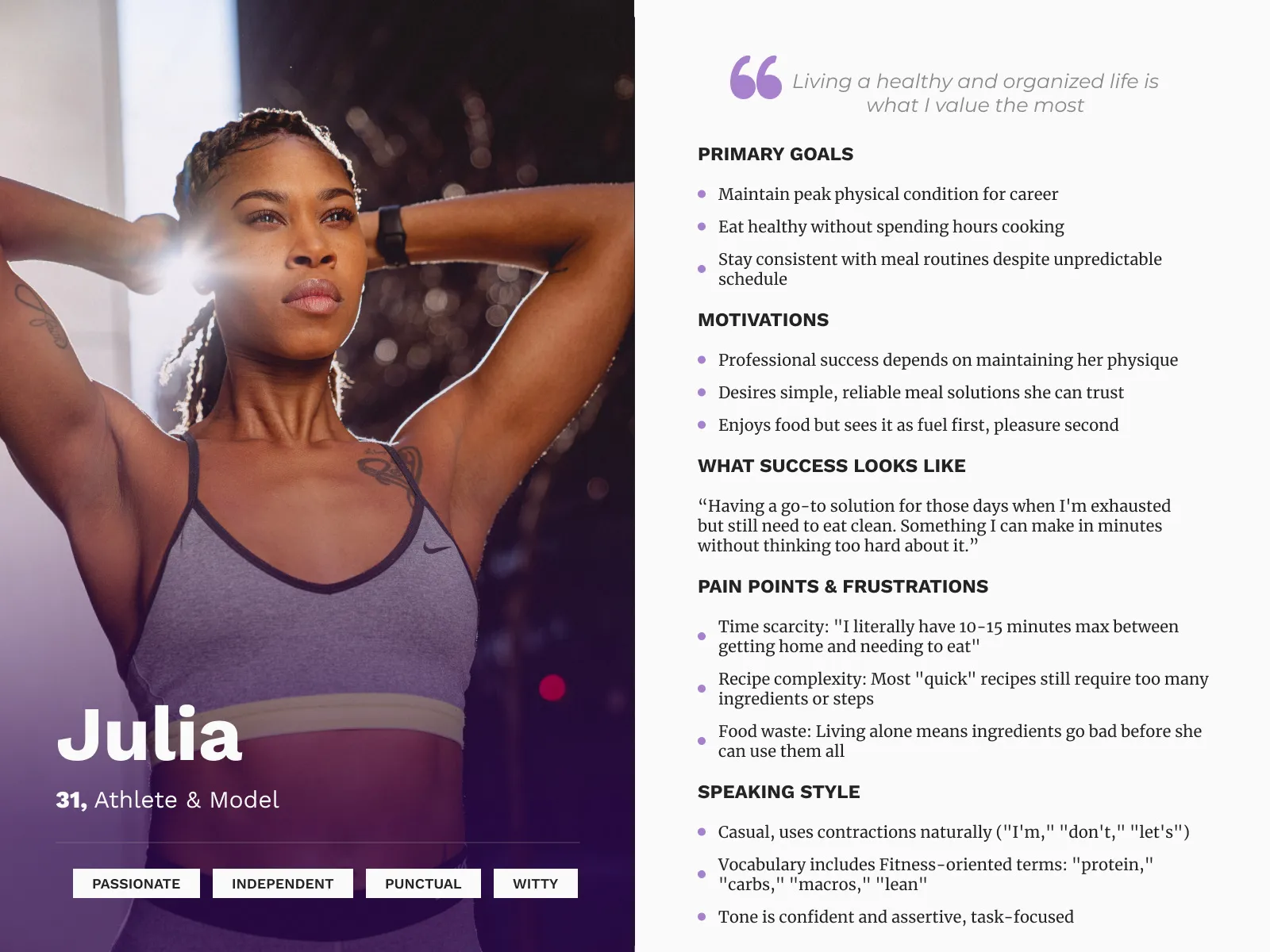
For this project, I focused on a user type I felt was underserved by traditional recipe experiences: someone time-poor, health-focused, and task-oriented, who values speed and clarity over browsing or inspiration.
The challenge was to design a voice experience that could:
- Help users choose a meal quickly
- Avoid overwhelming them with too many options
- Guide them clearly through cooking
- Recover smoothly when users miss a step or change their mind
What I Changed
I translated a basic recipe skill into a more intentional product concept with a clear user voice and interaction model.
I defined a focused use case around high-protein meals in under five minutes, rather than a broad cooking assistant. This helped narrow the experience and make the value proposition much clearer.
I developed:
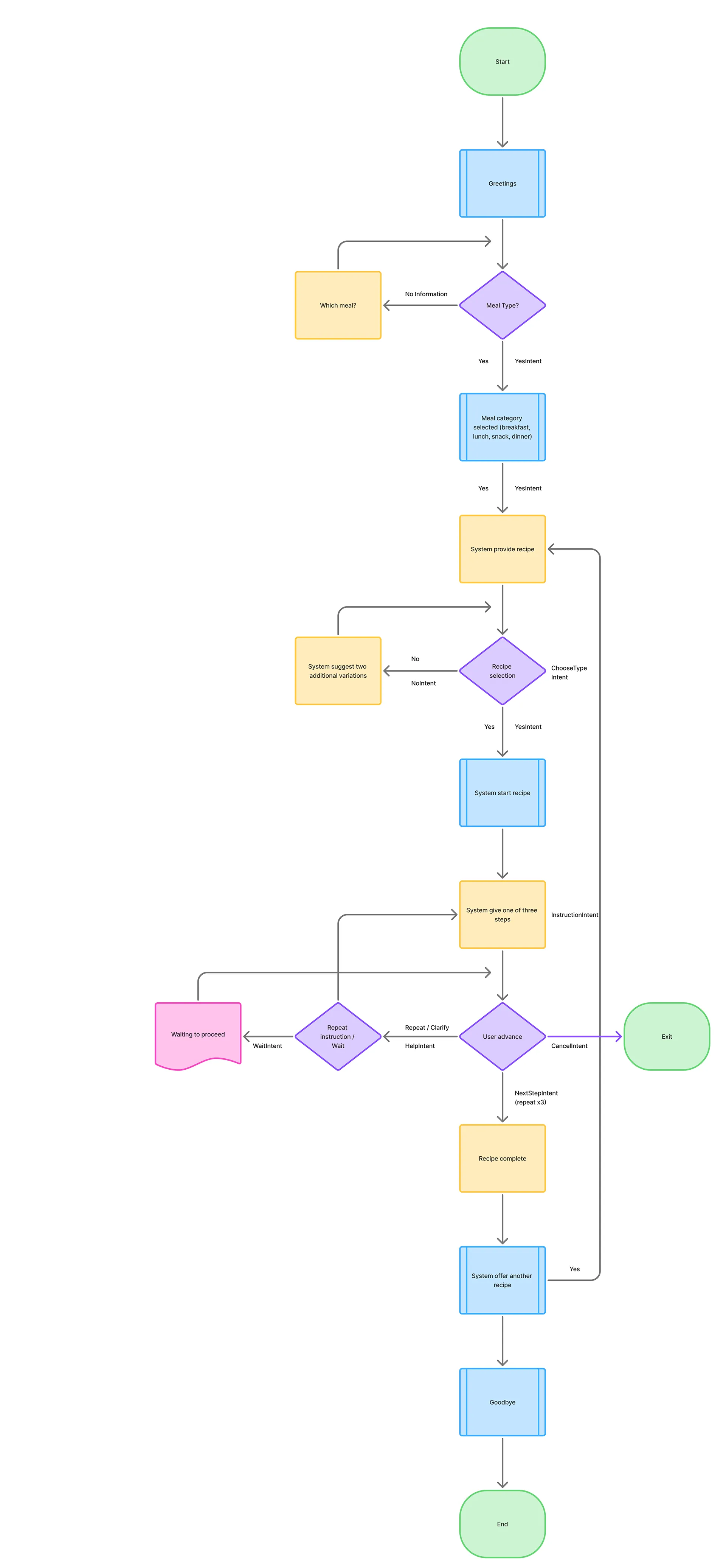
- A clearer onboarding flow with meal buckets for breakfast, lunch, dinner, and snacks
- Recipe suggestion and confirmation patterns
- Hands-free step navigation through commands like next, repeat, and start over
- More consistent voice and tone through the “Coach Marcus” persona
- Recovery behaviour for misunderstandings and unsupported requests
I also used AI as part of the design process to accelerate ideation, refine dialogue patterns, and explore how future versions of the product could support more adaptive recommendations based on ingredients, preferences, or prior behaviour.
Key Design Decisions
Narrowing the concept to a specific user need
Rather than designing for “anyone who cooks,” I focused the skill around quick, high-protein meals for busy users. This made the interaction model more coherent and the product easier to position.
Using progressive disclosure
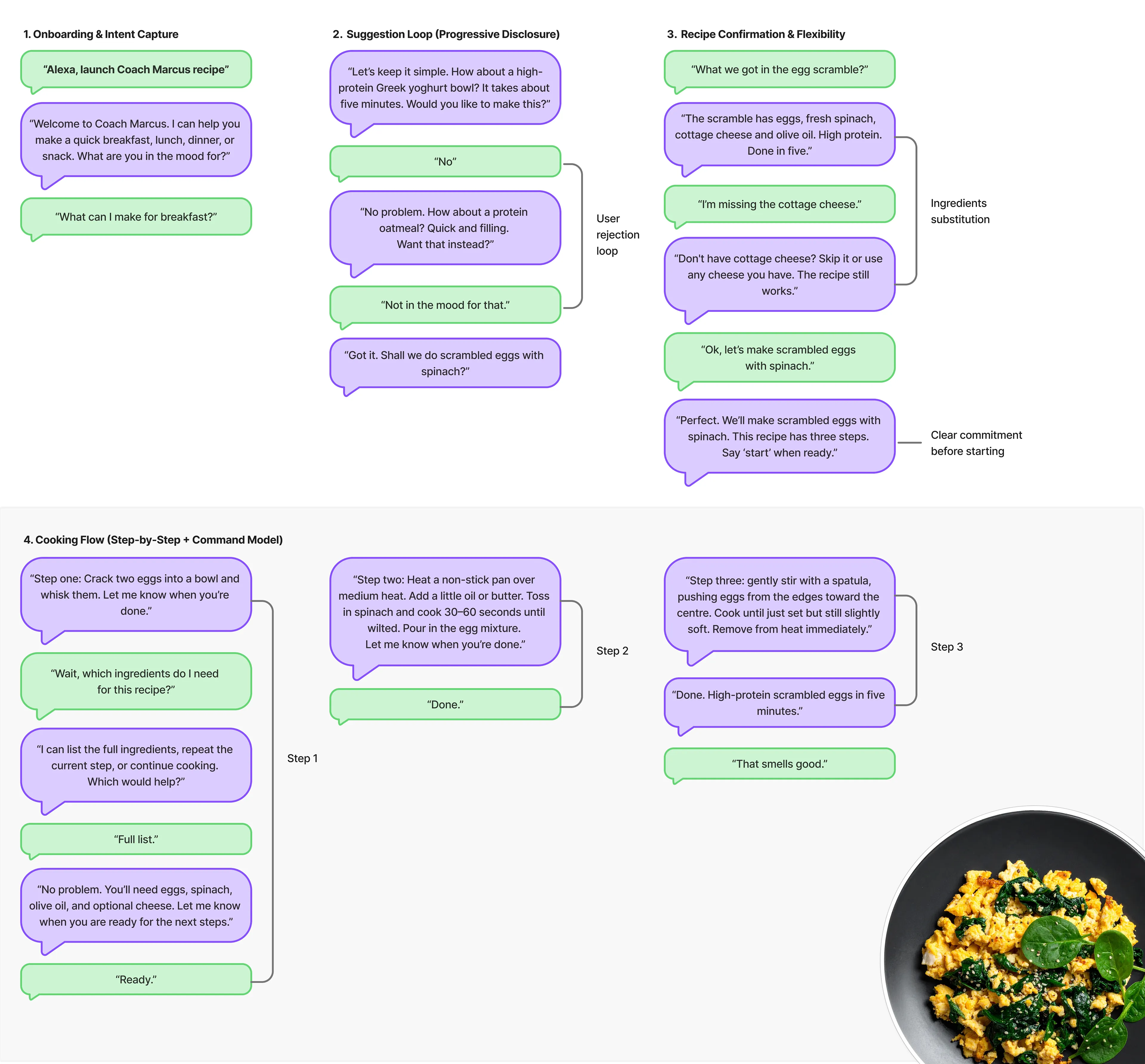
Instead of presenting long lists of recipes, the system suggests one recipe at a time and lets the user reject it if needed. This reduces cognitive load and keeps the interaction moving.
Designing for hands-busy, low-attention contexts
The interaction was built around simple, memorable commands and short instructions. Since cooking is sequential, voice was used to support one step at a time rather than delivering too much information upfront.
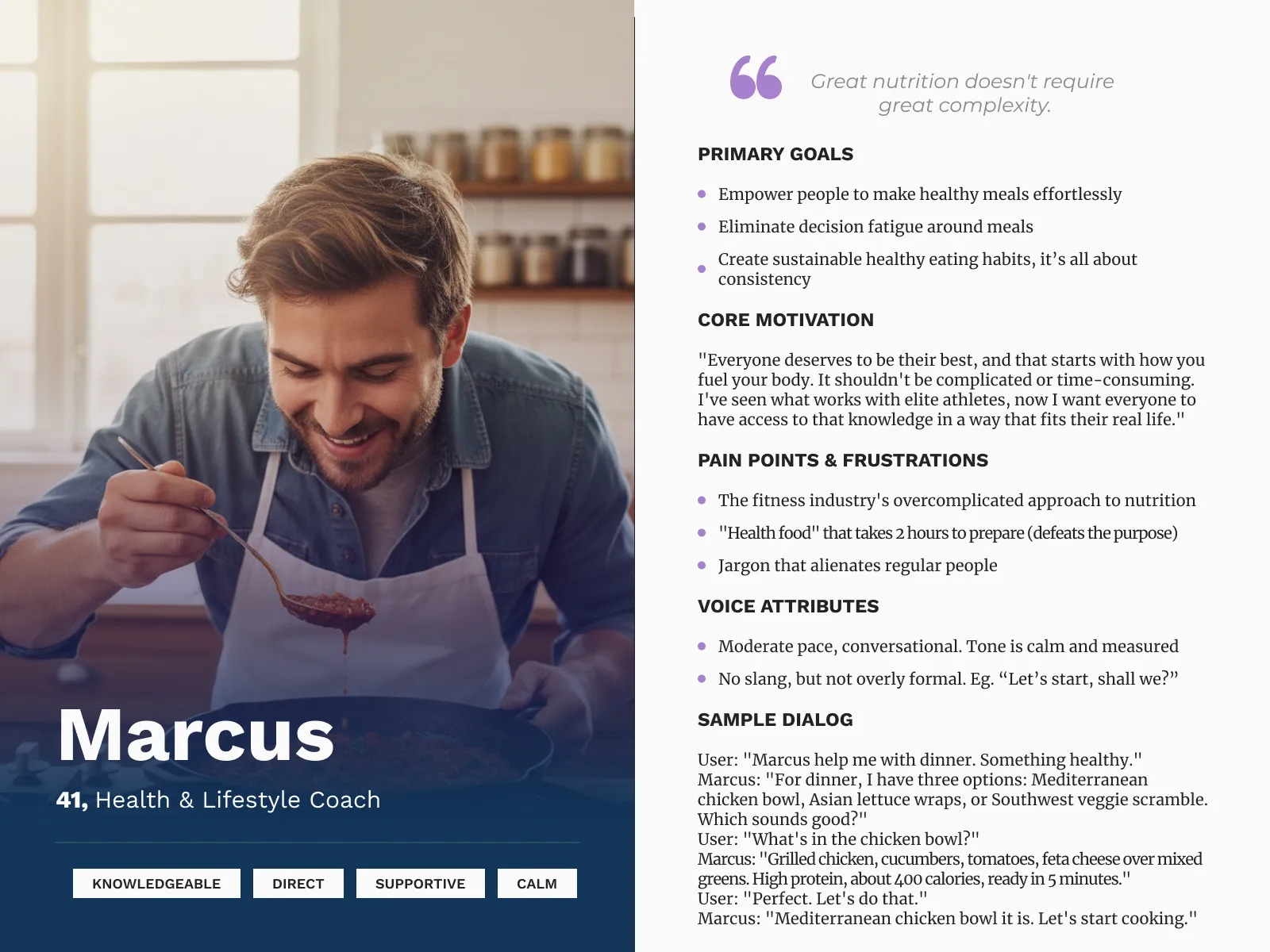
Creating a clear voice persona
I shaped Coach Marcus as direct, supportive, and efficient. The goal was to make the experience feel more purposeful than a generic assistant, without becoming overly performative.
Improving recovery and trust
I added and refined commands like repeat and start over, and removed moments where the system implied capabilities it didn’t actually support. This was important because small breakdowns in voice interfaces quickly reduce trust.
Exploring AI-enhanced behaviour
Although the implemented prototype remained rules-based, I framed the concept to show how AI could make it more useful over time through personalised suggestions, ingredient substitutions, and context-aware recommendations.
Voice Script: Getting a Breakfast Recipe
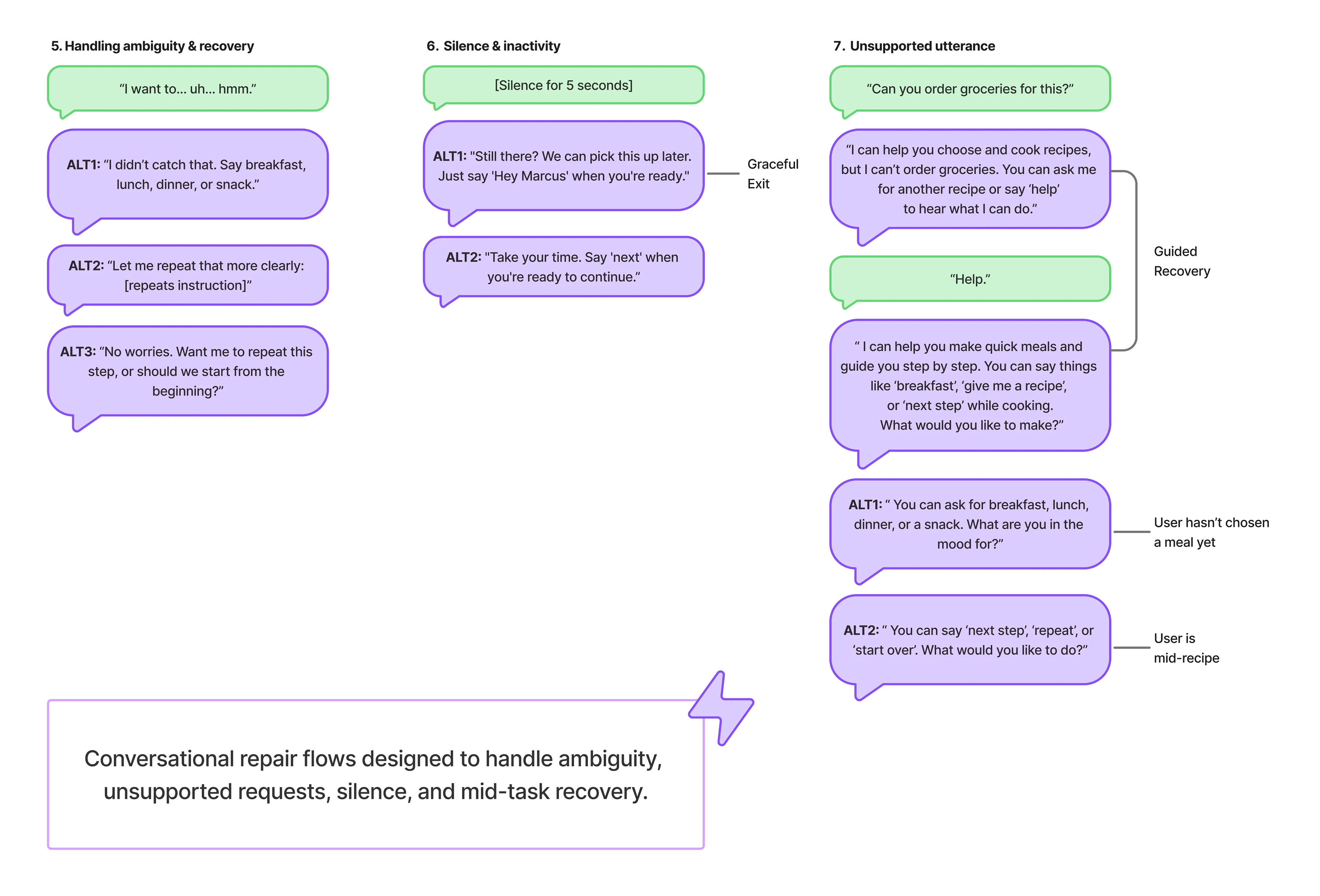
Designing for Failure: Conversational Repair
Voice interfaces don’t provide visual navigation cues, so I designed recovery paths to help users continue naturally when conversations broke down.
I mapped common failure scenarios such as:
- Unclear input
- Silence or hesitation
- Unsupported requests
- Users getting lost mid-recipe
To reduce friction, I designed conversational repair strategies that:
- Re-prompt users with clear next actions
- Adapt guidance based on conversational context
- Gracefully recover unsupported requests
- Prevent users from reaching dead-end interactions
If the user says “help,” the assistant provides contextual guidance based on the current state of the interaction:
- before recipe selection → suggests meal categories
- during cooking → explains step controls like “next,” “repeat,” and “start over”
This approach keeps users within the primary task flow rather than restarting the interaction entirely.
AI Opportunities
Future version could include:
- AI recipe generation
- Nutrition analysis
- Personalised recommendations
Example: “Based on your previous meals, I suggest a high-protein Mediterranean bowl.”
AI features:
- dietary adaptation
- macro tracking
- ingredient substitution
Why It Matters
It pushed me to think more deeply about:
- Cognitive load in real-world contexts
- Interaction design without screens
- How small wording choices affect trust and usability
- The relationship between system capability and user expectation
It also gave me a practical way to show how AI can support product thinking, not just generate content. In this case, AI was most valuable when used to accelerate exploration, compare dialogue options, and imagine more adaptive future behaviours grounded in user context.
More broadly, the project reflects the kind of design work I enjoy most: simplifying complex or high-friction moments into something clearer, more useful, and easier to act on.